


Arkansas Storm Team
4.4732.00 Reviews
App Specs
- Version
- 6.2.512
- Updated On
- License
- Free
- Downloads
- 50,000+
- Developer
- Nexstar Inc.
- Categories
- Weather
- Platform
- Android
Screenshots
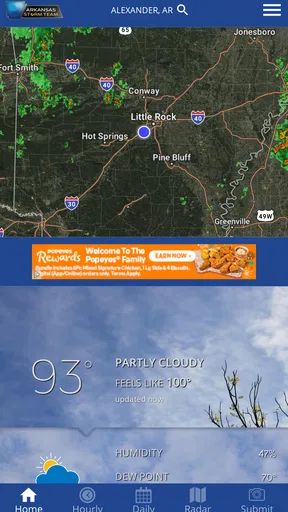
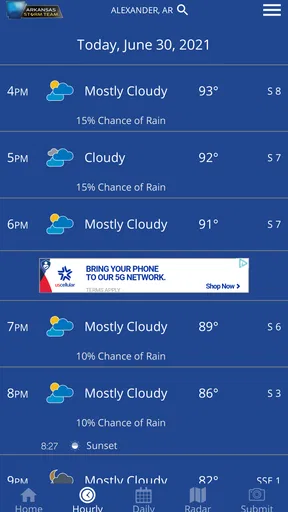
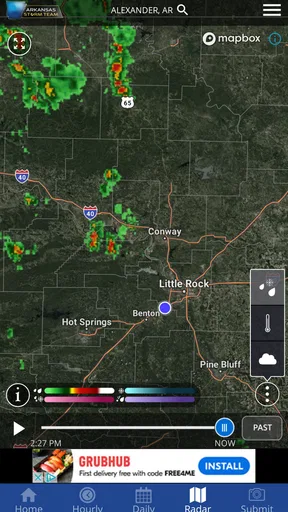
 Analysis by AppCompare
I installed Arkansas Storm Team expecting a straightforward local forecast tool, and that is exactly where it makes the strongest impression. This free weather app from Nexstar Inc. is built for people who want Arkansas-focused information without sorting through a broad national service first. Its store summary presents it as a comprehensive option for the state, but I found its real value in the way a local weather app can fit into ordinary decisions: whether to leave early, postpone an outdoor job, pack for a school run, or keep an eye on a developing storm.
The app has been available since March 10, 2014, and its current version is 6.2.512. That history matters because this is not a brand-new experiment trying to prove that a weather app belongs on your phone. It is an established product with a focused audience, a free download, an Everyone content rating, and support for devices running Android 9 or later. The audience is clearly regional rather than global, so the right question is not whether it replaces every weather service. The better question is whether its Arkansas-centered approach is more useful to you than a general-purpose forecast app.
How the app feels in everyday Arkansas weather decisions
My first impression was that the app makes most sense as a quick decision-making tool rather than something I would browse for entertainment. Weather information is only useful when it answers a practical question, and a local application has an advantage when the forecast needs to be interpreted in the context of Arkansas. A national app may show a clean temperature line, but a regional weather product feels more relevant when conditions are changing quickly across nearby communities.
The store short description, “Arkansas Storm Team,” sets the expectation clearly. This is not presented as a generic world-weather dashboard. I would open it before commuting, during a day of outdoor work, or when a line of storms was approaching, rather than using it to compare climates in distant cities. That focus is a strength for local residents, but it also means travelers and people who regularly move between states may prefer a broader service with a more universal interface.
One realistic routine is checking the app twice before leaving home. In the morning, I would use it to decide whether normal travel plans are reasonable. Later, I would check again before heading back, because a calm start does not guarantee a calm evening in a state where conditions can shift during the day. That second check is more useful than relying on a forecast remembered from breakfast. The app works best when it becomes part of that habit instead of being opened only after severe weather has already become obvious.
I also see value for households managing several schedules. A parent can check conditions before a school pickup, someone working outside can reassess a job site, and a driver can decide whether extra travel time is sensible. Those are small use cases, but they explain why a local weather app can earn a permanent place on a phone. The benefit is not simply knowing the temperature; it is having a nearby, relevant source available when a plan needs to change.
A focused tool rather than a universal weather replacement
Compared with the default weather app on a phone, Arkansas Storm Team has a more regional identity. Default apps are convenient because they are already installed and usually cover many locations. They are often enough for a quick glance at today’s conditions. I would choose this app when local context matters more than convenience, especially if Arkansas is where I live, work, or travel most often.
Worth Reading Before You Choose

EA SPORTS FC Mobile 26 Is a Bigger Football Game, but It Takes Time

Flipboard Shows What News Apps Must Do Beyond the Feed

Switching to Android Auto Means Rethinking Your Driving Routine

Google Calendar Makes a Crowded Week Easier to Manage

Ludo King Makes the Most of the Minutes Between Plans

Baby Panda World Brings Quick Play to Modern Phones, but Its Game Library Feels Busy
Compared with large national weather platforms, the trade-off is different. Those services may be better for people who want a single app covering multiple states, international travel, long-term location lists, or a highly customized weather dashboard. I would not install this one solely because I need a weather tool for many unrelated destinations. Its appeal comes from narrowing the experience to the state it is designed to serve.
That specialization can also make the app less intimidating for someone who does not want layers of maps, charts, and settings. A person who only needs dependable local awareness may appreciate a focused starting point. On the other hand, users who enjoy comparing models, exploring detailed atmospheric data, or building elaborate weather-monitoring screens may find a specialist local app less satisfying than a technical weather service.
What its long development history tells me
The release history gives the app a useful sense of maturity. Since it first appeared in 2014, it has had time to remain relevant through changing phone hardware, operating systems, and user expectations. The current version, 6.2.512, shows that the product is still being maintained rather than left as an untouched legacy download. I would treat that as a positive sign for someone choosing between an established regional app and an unfamiliar newcomer.
At the same time, a current version number by itself does not tell me that every part of the experience has been redesigned. That distinction is important. A maintained app can remain familiar and dependable while still carrying older design decisions. Existing users may appreciate continuity, while new users accustomed to very polished, gesture-heavy weather interfaces may notice that the experience feels more practical than fashionable.
For me, the best way to judge the evolution is by asking whether the app reduces friction during a real weather check. If I can open it, find the information relevant to my area, and understand what it means for the next decision, then the product is doing its job. A weather app does not need to look revolutionary to be useful. It does need to remain clear when the forecast becomes urgent.
What existing users are likely to appreciate
The app’s audience appears to have responded well overall: it carries an average rating of 4.4 from around 2.4 thousand ratings, with more than 700 written reviews and over 50 thousand installs. I read those figures as evidence of a real regional audience rather than proof that every user will have the same experience. Weather apps are especially personal because usefulness depends on location, notification preferences, phone performance, and how much detail each person wants.
For an existing user, the biggest benefit of an updated version is usually not a dramatic new feature. It is confidence that the app remains usable on a current phone and continues to serve its original purpose. Someone who has relied on the Arkansas Storm Team brand may prefer not to rebuild locations, habits, or expectations inside a completely different service. Familiarity is valuable when weather is changing quickly and there is no time to learn a new interface.
There is also a practical advantage to keeping a regional app alongside a general weather service. I would use a national app for broad travel planning and keep this one for local awareness. That two-app approach avoids forcing one product to do everything. It also gives me a way to compare information when a forecast seems uncertain, although I would avoid turning every small difference into a reason for alarm. Forecasts are guidance, not guarantees, and multiple apps can sometimes create confusion instead of clarity.
A useful habit for established users is to review the app before the season when they expect to use it most. I would check that the application still opens comfortably, that the chosen location is correct, and that I understand where to find the information I care about. This is not glamorous advice, but it prevents the common mistake of waiting until severe weather is nearby to discover that an old app setup no longer suits the phone or routine.
Where the experience may fall short
The narrow geographic focus is the clearest limitation. If you live outside Arkansas, visit several states frequently, or need one weather dashboard for a nationwide route, this may not be the most efficient choice. Even if the app can be useful while traveling, its identity is local, and I would not select it as my only weather companion for a life spent moving between regions.
Another possible friction point is the gap between “comprehensive” and “simple.” A comprehensive local service can be valuable, but different users interpret that word differently. One person wants an easy glance at conditions, while another expects deep technical detail and extensive customization. I would recommend trying the app with a specific task in mind instead of assuming that a broad description automatically means it has every advanced tool found in specialist weather software.
Users who want a highly personalized experience should also think about their own habits. If you prefer a minimalist widget, a single current-temperature view, or a service that quietly handles everything through the operating system, a dedicated local app may feel like an extra step. If you want to actively check regional weather and make decisions from that information, the extra step is easier to justify.
There is a more subtle limitation with all local forecast tools: regional relevance does not eliminate uncertainty. A storm can affect one neighborhood differently from another, and conditions can change between the time you check and the time you act. I would use this app to improve awareness, not to make risky decisions without judgment. For outdoor work, driving, or family plans, the forecast should be one input alongside visible conditions and official safety guidance.
Three smarter ways I would use it
First, I would use it as a decision checkpoint, not as background decoration. Instead of opening it repeatedly without a purpose, I would check before leaving, before starting an outdoor activity, and before returning home if the day looks unsettled. This creates a simple workflow: identify the plan, check the local forecast, decide whether the plan needs extra time or a backup, and reassess when conditions change.
Second, I would keep the app available even if I already use the phone’s built-in weather screen. The two tools serve different roles. The default screen is convenient for a quick glance, while a regional service can become the place I go when the local situation deserves more attention. That separation prevents me from judging the app only by how quickly it shows a temperature. Its value is greater when I need context for Arkansas rather than a generic snapshot.
Third, I would avoid checking only when a storm is visible. A better workflow is to establish a baseline earlier in the day, then revisit the forecast as plans approach. This is especially helpful for people with fixed commitments, because it gives them time to change clothing, adjust travel, move an outdoor task, or warn others. The app cannot control the weather, but it can make the timing of a decision less reactive.
These habits also reveal the main trade-off. The app rewards users who actively consult it, while someone looking for a completely passive experience may get more from a system-integrated weather service. I would recommend it to a friend who wants a local source they can intentionally check, not to someone who never opens weather apps and expects every important change to be handled automatically.
Who should install it and who should look elsewhere
I would recommend Arkansas Storm Team to Arkansas residents, families with local routines, outdoor workers, commuters, and anyone who wants a regional weather app from a recognizable developer. It is particularly suitable for people who find national weather services too broad or too cluttered and want their regular location to be the center of the experience. Because it is free and rated for Everyone, the barrier to trying it is low.
I would be more cautious about recommending it as the only weather app for frequent travelers. If your week includes several states, or if you need international forecasts, a broader alternative will probably be more practical. I would also point technical weather enthusiasts toward a service designed around deep data exploration if that is their main goal. This app’s strongest case is local usefulness, not serving every possible weather workflow.
Parents should appreciate that the content rating is Everyone, but I would still frame the app as a tool for shared judgment rather than a substitute for adult supervision during dangerous conditions. A child can learn to look at the forecast, yet decisions involving storms, driving, or outdoor safety should remain with a responsible adult. The rating makes the app broadly approachable; it does not change the seriousness of the information it may display.
What to watch as the app continues forward
The next stage of improvement should preserve the local focus while reducing any effort between opening the app and understanding the situation. I would watch for continued compatibility with newer devices, clearer presentation during fast-changing weather, and refinements that help both casual users and people who check forecasts several times a day. Those are the areas that matter most to a mature weather app: clarity, speed of understanding, and confidence during an uncertain moment.
I would also pay attention to whether future updates balance regional depth with flexibility. The product should not lose its Arkansas identity in an attempt to imitate a massive national platform. At the same time, users may reasonably expect smooth location handling and an experience that remains useful when they temporarily leave their home area. The best evolution would expand convenience without diluting the reason people chose a local service in the first place.
My final view is positive but specific. Arkansas Storm Team is not the universal answer for every weather user, and I would not pretend that a regional app replaces a broader service for travel or technical analysis. For someone whose daily life is centered in Arkansas, however, its focused purpose makes sense. The free price, continuing maintenance, accessible age rating, and established presence all support giving it a try. I would keep it as a practical local checkpoint, use it before important plans, and pair it with a broader alternative only when my needs extend beyond Arkansas.
Pros
- Accurate local forecasts tailored to Arkansas communities.
- Live radar helps track storms as they develop.
- Severe weather alerts can provide valuable warning time.
- Video forecasts offer clear explanations of changing conditions.
- Useful daily and hourly forecasts for planning ahead.
Cons
- Some features may depend on a stable internet connection.
- Frequent alerts can become distracting during active weather.
- Radar and forecast details may vary by location accuracy.
- The app may use noticeable battery while tracking location.
- Coverage is focused on Arkansas and less useful elsewhere.
FAQs for Arkansas Storm Team
What is the Arkansas Storm Team app used for?
The Arkansas Storm Team app provides weather information for users who want to follow conditions across Arkansas. It typically includes current temperatures, hourly and extended forecasts, radar imagery, severe weather alerts, and updates from the station’s meteorologists. After installing it, you can use location services or search manually to monitor weather in your city, helping you prepare for storms, heavy rain, strong winds, or changing temperatures.
Does Arkansas Storm Team provide severe weather alerts?
Yes, the app is designed to keep users informed about significant and potentially dangerous weather. Depending on your location and notification settings, it may send alerts for severe thunderstorms, tornado warnings, flash flooding, winter weather, and other hazards. Notifications are especially useful at night or when you are away from a television, but they should complement—not replace—official emergency instructions from local authorities.
Can I use the app to view weather radar and track storms?
Arkansas Storm Team generally includes interactive radar tools that help users observe precipitation and follow developing storm systems. You can usually zoom in on your area, view movement over time, and compare radar information with warnings or forecast details. Radar is helpful for understanding where rain or storms are moving, although coverage and update speed can vary depending on your internet connection and the app’s data sources.
Does Arkansas Storm Team require my location or personal information?
The app may request access to your device location so it can display local forecasts and deliver relevant weather alerts. You can often deny location access and add cities manually, although this may make automatic notifications less convenient. Before downloading, review the app’s permissions and privacy policy, particularly if you are concerned about data collection, advertising, analytics, or how location information is handled.
Is Arkansas Storm Team free to download and use?
Arkansas Storm Team is generally available as a free download for compatible Android and iOS devices. Basic features such as forecasts, radar, news, and weather alerts are normally accessible without a subscription, though the app may include advertising or optional features. Availability, supported devices, and specific functions can change with updates, so check the official store listing for the current requirements before installing.


